
Invite a community member to BonkX from the Bonk Discord!
How to invite someone to BonkX:
Copy your unique BonkX referral link from below.
Go to the Bonk Discord Community and send your referral link to a friend who isn’t yet part of BonkX.
Make sure at least one person signs up to BonkX using your referral link.
Important Notes:
Only signups through your unique referral link count.
Referrals are tracked automatically.
Share responsibly and follow all community guidelines.
Add your BonkX link to your Discord Bio
How to add your referral link to your Discord bio:
Open Discord and click on User Settings (bottom left corner).
Navigate to Profiles.
Click Edit Profile.
Paste your unique BonkX referral link into your About Me section.
Save your changes and make sure your updated bio is visible in servers.
Important Notes:
Keep your referral link visible in your bio for at least 24 hours.
Only your official BonkX referral link counts for this quest.
Do not add other brands, links, or emojis that could interfere with verification.
Submit Screenshot Proof of Your Discord Message
How to submit your screenshot to verify you have sent the referral link to the Bonk Discord Community:
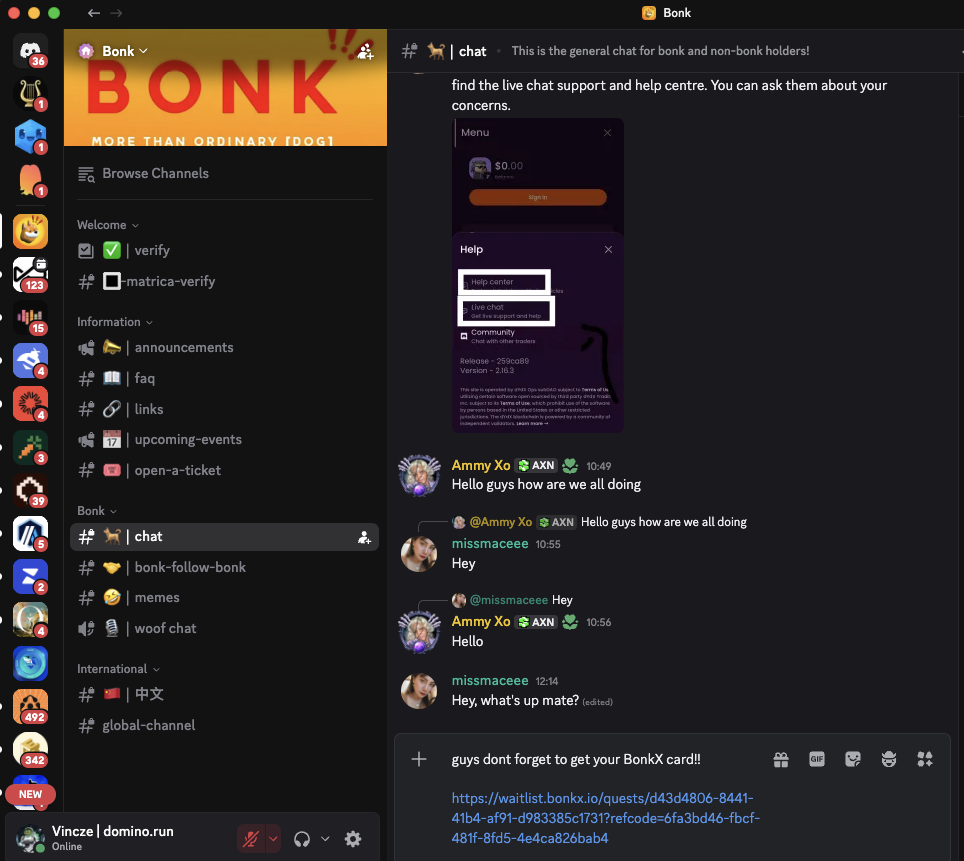
Complete this part of the quest by sending a message with your unique BonkX referral link to the official Bonk Discord Community.
Take a clear full-window screenshot showing your Discord message with the referral link visible in the Bonk Community. Make sure the link and the Community Name are fully legible and clearly displayed.
Upload your screenshot as proof of completion. Ensure it matches the example format provided: https://domino-user-content-prod.s3.gra.io.cloud.ovh.net/media%2Fuploads%2F1770820453103-CleanShot%202026-02-11%20at%2015.33.50.png
Important Notes:
The screenshot must clearly show the Bonk Discord with a message containing the BonkX referral link, sent by your account.
Blurry, cropped, or incomplete screenshots may be rejected.
Follow the example format exactly to ensure your submission is accepted.